Table of Contents
Playing a Discord Game
Reference II will be played using Discord, a platform that’s like if Slack were designed for having fun. Discord has both voice and text capability, though Reference II will be conducted entirely through text. The following is a basic guide on how to use Discord in a Society Game. Specific information on how Reference II will make use of the Discord format can be found in Discord in Reference II.
Getting on Discord
Here's a quick guide to joining the Reference II Discord Server for the first time. For a definition of some of the terms used here, please see the Glossary.
Sign up to Discord using an email account (this should be a personal address, not your IC email address, and is not displayed to other Discord users). You can do this by downloading and installing the Discord desktop app, or by simply using the browser version. There is also a Discord mobile app, which works almost identically. Reference II does have plans to use a very small amount of colourful text in Discord messages, which do not appear in colour on the mobile app, we do not anticipate this having a material impact on players' experience.
Once you have signed up to Discord, you can join the Reference II server via the invite link. This will be sent out in due time, so pay attention for that, or ask a GM if you can't find it.
You can see all the servers that you are part of in the Discord sidebar on the left-hand side, where they will be represented by circular icons. Select the Reference II server from this sidebar.
You can change your profile picture by clicking the gear icon (User Settings) at the bottom of the channel sidebar on the left-hand side. This will take you to the 'My Account' tab where you can edit your username, password and profile picture.
What You Do During Uptime
During Uptime, you will have access to text channels, both IC and OC. They will be listed in the channel sidebar on the left-hand side and will be appropriately named so it is clear what they are for. Channel names always start with a # (hash) symbol. Selecting one will allow you to view the channel and, if you have permission to do so, type in it. Some channels may have restricted permissions, such as allowing you to view but not type in the channel. If you feel there are errors, contact a GM (who will be listed under the “GM” subheading in the user sidebar on the right-hand side) in the channel labelled “#oc-tech-support” by tagging them in your message with “@GM” or “@<their username>”.
During the game, new IC text channels may appear to you, and old ones may disappear. This may reflect the location that the channel represented no longer existing or being accessible. For example, in Reference II, when entering a Story, you will gain the ability to see the IC channels associated with that Story. If you believe there has been an error, message a GM before messaging in the channel. There may be opportunities in play to gain access to specific channels with a limited number of other players. These will be arranged and monitored by GMs.
Remember, access to the internet can vary significantly in quality, as can the functionality of peoples' computers, so please don't become frustrated if someone doesn't respond to you immediately: they may be experiencing technical difficulties!
Private messaging within Discord is not an IC mechanic and should not be used unless you need to speak to a specific GM in confidence. This is because GMs need to be able to see what you are writing in order to moderate the game properly!
Usually messages sent in channels represent actions that your character is taking. For example a player writing:
Welcome to Alusia!
in an IC channel during uptime would be interpreted as their character saying those words. Similarly a player writing:
Jimbo starts reading a book.
would be interpreted as the player's character Jimbo reading a book IC. Players will only be able to describe their own actions. On the other hand, GMs and Crew will be required to narrate actions taken not just by the NPCs they play but also sometimes of Player Characters, usually to outline the outcome to a conflict or plan. To distinguish speech from description of a PC's action, it is common, though not universal, to enclose speech in “speech marks”, and/or italicise actions.
Finally, messages in square brackets sent to channels in Uptime are interpreted as OC commentary, for example:
[That's concerning…]
or
[OC: That's concerning…]
Both are valid ways of indicating a message is out of character. Please do not use square brackets in IC channels for anything other than indicating that the message is OC.
Discord Messages
Reference II is a Discord text roleplaying game, which can be strange to those who haven’t tried it before. The following are helpful things to know whilst roleplaying on Discord:
To have a message be in italics, underlined, bold, strikethrough or spoilered (blacked out), highlight the text and select the appropriate option(s).
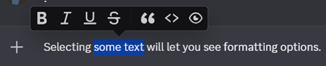
Alternatively, text can be formatted by surrounding it with the appropriate characters as illustrated in the image below: a single asterisk (*) or underscore (_) for italics; a double underscore (__) for underline; double asterisks (**) for bold; double tilde (~~) for strikethrough; or a double pipe (||) for spoilertext.
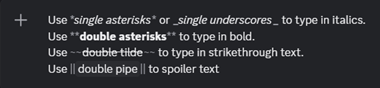
A message that is blacked out is spoilered. All spoilered messages in Reference II will be preceded by a non-spoilered text indicating what they might contain and/or who can view them. You can view these messages by clicking on them.
The primary OC use for spoilertext is to indicate that the message's content is potentially upsetting and requires a content warning. While OC spoilertext can be sent in IC channels, players should remember to place the entire message in square brackets to emphasise the OC nature. In OC channels the square brackets are unnecessary.
Content warnings should be indicated using “[CW (contents): ||message||]”, for example:
[CW (bugs): ||BUGS!||]
You can also reply to a message by hovering over a message that has already been sent and selecting the “reply” option. This will allow you to send a direct reply which quotes the original message and notifies the person who originally sent it. If you are replying to your own message, you will need to find the “reply” option in the menu that appears after clicking the three dots.

Warning: In Reference II, the GMs will often send messages using PluralKit. Replying to these messages directly will not notify the sender, and you must instead react using the bell icon under the message. For more details, consult the link above.
To address a message directly to someone in a public channel, type @ before their handle, and this will notify them, taking them directly to your message. This is also referred to as “tagging” them in your message.
To start a new line without sending the message, hold shift and press enter.
Other Discord Features
Channels
Within a Discord server, there can be many different text chats, known as text channels, to help keep conversations separate. Each channel has a name, and the channels available are accessible through the menu on the left side of the server. Discord also supports voice channels, though these are not normally used for ORPGSoc Discord games.
Channels in a Society Game are usually split into three categories: OC channels, IC channels and Private channels, and will be clearly marked as such.
OC Channels
OC Channels are channels which are dedicated to out of character information and communication. This will include a tech support channel, a general OC chat, and a place to post bot commands so as to avoid spamming other channels (we recommend muting this by right-clicking the channel and selecting 'Mute Channel > Until I turn it back on'!).
OC channels will remain visible to players at all times, and will be the topmost channels in the channel sidebar so as to be the most easily accessible.
IC Channels
IC Channels, often called Uptime channels, are the channels in which the role-playing for the game will take place. Often, the channels are used to represent a specific physical location within the game's universe, though they may have other purposes as well. Where channels represent locations, please remember that, in general, your character can only be in one location at once, so don't post in more than one location channel at once. You don't have to let people know when your character is leaving one location channel and going to another, but we encourage you to put a quick line in to let people know your character has left. Also, if your character is in one channel but not another, please remember that your character would only have knowledge of what's happening in their location – even if you can read messages in other channels!
Any messages sent in an IC channel are assumed to be In-Character, unless specifically marked otherwise using [Square Brackets]. Discord permits emoji reactions to messages, and these are assumed to be OC reactions, even when these are used in IC channels.
Private Channels
Every player will have access to a private channel accessible only by them and the GM team. This channel will be presided over primarily by the GM assigned to you. Your GM may ask that you tag them in your messages so that they will be notified (GMs have an extremely large number of channels to moderate!). This is a good place to ask GM questions that may otherwise get lost in an OC channel, or that you don't want other players to see. Since the messages in private channels may involve player welfare, messages sent in these channels will be treated as confidential, and will only be seen by the GM team and the player.
In some Society Games, you will also have private channels shared between only a small number of players and the GMs. This will usually be so that characters who have a specific connection to each other can communicate in private. In Reference II, these shared channels are not expected to exist at the start of the game, as player characters will not know each other in advance (see here), but might be added if requested partway through the game.
Roles
By left clicking on your name in the user sidebar, you can see which roles you have been given. Roles are a feature in Discord which allow an admin to easily control permissions such as access to hidden channels and the ability to send messages rather than simply reading them. You can see a user's roles by clicking on their profile picture: this is an OC feature of the game, as roles only contain OC information. Roles can also be assigned hierarchies and colours. A user's username or nickname on Discord will appear in the colour of their highest ranked role. This is useful for example to distinguish GMs from players. See Discord in Reference II for more information on how Discord roles will be used in Reference II.
Bots
Some useful features are not implemented directly into Discord, and have instead been created through external systems known as bots. For ORPGSoc games on Discord, the most common use for bots is to simulate sending messages from a different name and profile picture to your OC name and picture. Usually this is done by GMs who are playing several NPCs, to make it clear which NPC is talking at any given moment. More information on the bots in use in Reference II can be found in Discord in Reference II.
In the event that a bot is offline, or if a player is unable to use it for whatever reason, GMs or crew will be able to respond to your specific help requests directly where you are @ing them in a channel. We are aware that this is always an option, but runs the risk of taking longer to get to your request, or losing it in the collection of other requests incoming.
If you notice any other issues with any of the Reference II bots, please tag the GMs in a message in the #oc-tech-support channel to let them know, and they'll get back to you about it as soon as possible. In general, please be mindful that crew and GMs are juggling many different things and may take a while to respond – we are here to help, but may need a moment!
The Most Important Thing to Remember
…is that it's not the end of the world if you're new to any or all of this! If you're unsure, you can always refer to this page or ask questions in the channels which will be set up on the Server, or you can contact one of the GMs privately if you'd like us to explain something in more detail. We hope you enjoy your Reference II experience, and we'll hopefully see you on the server very soon.